Key Milestones In A Beginner Friendly DevOps Learning Path For Fast Growth
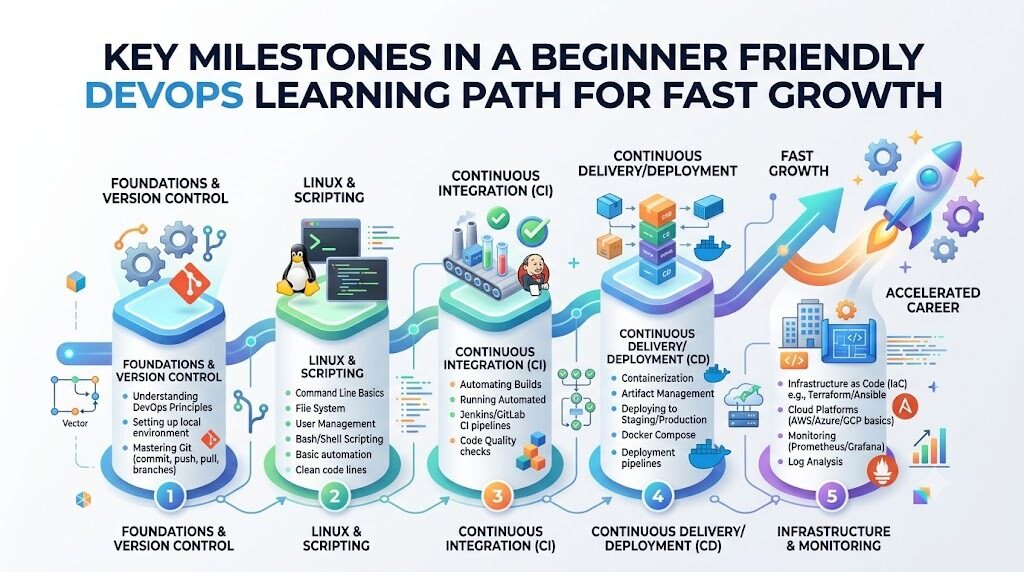
What Is a DevOps Roadmap?
DevOps connects the people who write code with the people who keep websites running smoothly. In the past, these two groups worked in separate rooms and blamed each other. Today, they work as one happy team to fix bugs and ship updates fast. A DevOps roadmap is simply a study map that shows what to learn first, second, and third. This clear path stops you from feeling stuck or scared. You do not need to learn hundreds of complex tools right away. Tools change every year, but basic computer skills stay the same for decades. Therefore, you should focus on strong basic habits first. A good map shows you the best order so you never feel lost.
A Simple DevOps Learning Path
Beginners should always start with the basic rules of computers before touching complex cloud tools. First, study Linux because most internet servers run on this free operating system. Next, learn Git so you can save every change in your code safely. Then, learn networking rules so you understand how computers talk across the web. After that, pick one cloud provider to rent online computers easily. Soon, you will pack apps into neat boxes called containers with Docker. Next, build automated pipelines to test your code every single day. Later, learn Kubernetes to run many containers without extra work. Also, learn how to write code that builds servers automatically. Finally, add monitoring tools to spot website crashes early and keep your setup safe.
| Learning Stage | Main Skills | Simple Goal |
| Stage 1: Basics | Linux, Git, and Web Networks | Control servers and track code changes safely. |
| Stage 2: Cloud and Boxes | Cloud Systems and Docker Containers | Package programs and run them on rented computers. |
| Stage 3: Automation | Build Pipelines and Code for Servers | Test apps and create systems with simple scripts. |
| Stage 4: Scale and Care | Kubernetes, Watch Tools, and Safety | Manage big apps and fix errors very fast. |
DevOps Engineer Roadmap
A great DevOps engineer knows how to tie many different skills together into one working machine. You start with Linux commands to move files and manage user accounts. Then, you use Git branches so teammates do not overwrite each other's hard work. Next, you write small scripts in Python or Bash to remove boring daily chores. After that, you set up cloud networks with safe firewalls.
Next, you pack your code into Docker containers so it runs anywhere without errors. Then, you connect a pipeline tool to check your code whenever you push updates. Now, you can use code to build fresh servers in just a few minutes. Also, you set up alarms to warn you if a server runs out of memory.
Here is a practical project that ties these pieces together:
You write a tiny web app that prints a greeting.
You save the app files inside a Git repository.
You wrap the app inside a clean Docker container.
You build a pipeline that tests the app on every update.
You rent a small cloud computer using server setup code.
You launch the container and check the live website online.
DevOps Tools You Should Understand
You do not need to buy or try every tool on the internet today. Instead, look at tools by their main job family so you stay organized.
| Tool Area | Purpose | Example Tools |
| Source Control | Save and track text changes in program code | Git, GitHub, GitLab |
| Containers | Pack apps and files into light portable boxes | Docker, Podman |
| Build Pipelines | Test and ship code updates without hand work | Jenkins, GitHub Actions |
| Container Managers | Run and heal hundreds of app boxes easily | Kubernetes |
| Server Code | Write plain text files to create cloud machines | Terraform, Ansible |
| System Watchers | Check computer health and sound alarm bells fast | Prometheus, Grafana |
Source control tools act like safe time machines for your project files. Container tools wrap your program so it runs the same way on any computer. Build pipelines automatically test your code to catch silly bugs before users see them. Container managers restart broken app boxes when something crashes at night. Server code tools build new online machines using simple written instructions. System watchers read memory charts and alert you before a server gets too full.
DevOps Tools Comparison Made Simple
Teams often argue about which computer program works best for their daily work. But picking a tool just because it is popular can cause big headaches. Instead, wise engineers compare tools using simple, practical tests. First, look at the exact purpose of the tool and check its basic features. Next, check if the tool is easy or hard for beginners to learn. Then, look at the total money cost for servers and user licenses.
Also, make sure the tool protects your data with strong security locks. Check if the tool offers friendly help forums or active support teams when you get stuck. Next, see if it connects smoothly with the software you already use. Finally, make sure your current team has the skills to run it well. The most famous tool might cost too much money or feel too heavy. A simple, lightweight tool often solves your daily problem much better.
DevOps Certifications Roadmap
A DevOps certificate is an online badge that shows you passed a timed technical test. Beginners often ask if they need five certificates before applying for work. The honest answer is no, because hands-on skill always matters much more. However, a good certification gives you a clear study target and builds your confidence. Beginners should only study for an exam after building real projects on their own computer.
First, pick an entry-level test from a major cloud provider or Linux group. Next, check the exam fee because tests can cost between one hundred and three hundred dollars. Make sure you read the official exam guide so you know every topic. Most certificates expire after two or three years, so you must renew them later. Practice on real command screens instead of just memorizing test questions from flashcards. A certificate opens the door for a job chat, but your actual project work wins the job.
SRE Roadmap
SRE stands for Site Reliability Engineering, which means keeping big websites fast, healthy, and awake. SRE engineers think like smart software makers who fix broken operations tasks. You need a solid base in Linux, computer networks, and cloud basics to start this path. Next, you learn how to collect system records called logs to see past events. Then, you build live charts to track how many people use the site each second.
You also set up smart alert bells that wake you up only for real emergencies. When an outage happens, you lead the fix and write a calm report on what went wrong. You use code to automate server repairs so the same bad crash never happens twice. SREs also agree on uptime goals so bosses know when a site runs well enough. Finally, you plan server capacity so traffic spikes do not knock your system down. Your everyday DevOps skills serve as the perfect starting ramp for learning SRE.
Platform Engineering Roadmap
Platform engineering is another exciting path that grows out of good DevOps habits. Platform engineers build internal self-service tools for their own company's software developers. Imagine a busy restaurant kitchen where cooks need clean pans and hot stoves right away. The platform team builds the kitchen machines so the cooks can make meals fast without plumbing chores.
To walk this path, you must master cloud computers, Linux, containers, and Kubernetes. Next, you build automated build pipelines and use safe server code. Then, you build a simple internal web store or command tool for your developers. A developer clicks one button to get a secure database, server, and web address instantly. This smart setup saves hours of boring waiting time for everyone on the team. It also stops developers from making dangerous security mistakes on company servers.
Real-Life Scenarios
The Broken Friday Update: A developer pushed new code at night and broke the store page. The team had no automated pipeline, so they fixed files by hand for four hours. Next week, they added automated tests that block broken code before it goes live. Now, updates launch safely during the day without panic.
The Full Server Disk Crash: A busy company database suddenly stopped saving customer orders. The server disk was completely full of old text log files. The team learned how to set up an automatic disk-cleaning script using Linux tools. They also added an alert that emails them when disk space drops below twenty percent.
The Slow Laptop Setup: A new worker spent three days installing tools and libraries on a laptop. Nothing worked right because the laptop used an older version of software. The team packed the entire work setup into a neat Docker container box. Now, new workers run one command and start working in ten minutes.
Common Mistakes to Avoid
Chasing too many tools at once: Beginners try to learn ten tools in a single week. Focus on one basic tool until you feel happy and confident.
Skipping basic Linux commands: Many learners jump straight into Kubernetes without knowing basic file permissions. Spend two weeks practicing Linux terminal commands first.
Ignoring version control safety: Beginners often forget to save small code changes in Git. Commit your work often with clear notes so you can undo mistakes easily.
Memorizing answers without practice: Reading test questions will not help you fix a live broken server. Build real labs on your laptop so your fingers learn the work.
Ignoring security rules: Some learners put secret passwords directly inside public code files. Always store passwords in private secret vaults or hidden environment settings.
Automating broken steps: Setting up a fast pipeline for messy code only creates messy bugs faster. Clean up your manual steps before you write automation scripts.
Skipping system monitoring: Teams often forget to check server memory until the entire site crashes. Always set up free metric dashboards before you launch an app.
Not asking for team feedback: Lonely learners stay stuck on simple errors for many days. Join friendly learner groups and share your project screens to get helpful tips.
How DevOpsSchool Fits Into Your Learning Plan
DevOpsSchool supports learners who want structured guidance for modern engineering skills. The platform offers step-by-step DevOps learning paths that remove guesswork for beginners. You can follow structured 90-day learning plans across DevOps, SRE, and platform engineering. Learners can also search a large technology directory to read clear DevOps tools comparison guides.
These free guides show you how different tools work before you install them. The platform also provides simple certification resources and a handy certification registry to check your progress. You can practice skills with hands-on labs and read plain-English tutorials. If you meet a strange word, you can look it up in their simple technical glossary. The site also shares helpful career resources and interview tips to help you get ready for jobs. It acts as an open, steady learning partner through every stage of your technical journey.
DevOps Jobs and Career Growth
Learning these modern skills opens up many rewarding technology jobs for your future. You can work as a DevOps Engineer who builds automated pipelines and manages servers. You can become an SRE who guards website speed, uptime, and system health. You might choose to become a Cloud Engineer who designs secure online networks for businesses. Another great choice is a Platform Engineer who builds friendly internal tools for other coders. Also, DevSecOps Engineers help protect systems by scanning code for security holes every day.
You can prepare for these modern DevOps jobs by building real public projects on GitHub. Practice fixing broken servers on your home computer so you can explain troubleshooting steps calmly. Interviewers love hiring beginners who can talk about real mistakes they made and fixed. Keep your resume simple, link to your project code, and explain your solutions with pride.
Frequently Asked Questions
1. What does DevOps mean in simple words?
DevOps is a way of working where coders and server operators work as one team. In the past, coders wrote software and threw it over a wall to server workers. That caused delays, anger, and website crashes. DevOps uses shared goals, smart habits, and automated tools so teams build, test, and deliver safe software updates every single day.
2. Can a complete beginner learn DevOps skills from scratch?
Yes, any beginner can learn these useful skills with patience and regular daily study. You do not need a fancy computer degree to begin your journey. Start with basic Linux terminal commands and learn how web networks pass data. Then, practice writing simple scripts to handle everyday computer tasks. Consistent daily practice matters much more than past technical knowledge.
3. Do I need to learn coding to work in DevOps?
You do not need to build complex video games or giant mobile apps to work here. However, you do need basic scripting skills to automate boring chores and connect tools. Python and Bash are the two easiest and most useful languages for beginners to study. Writing fifty lines of helpful script code is plenty for most entry-level jobs.
4. Which operating system should I learn first?
You should definitely learn Linux first because it powers most cloud servers and internet sites. Windows is popular for office laptops, but Linux runs the back end of the internet. Learn how to navigate folders, edit text files, and check running programs from a black terminal screen. Mastering these basic Linux terminal commands makes every other tool much easier.
5. What is the difference between Docker and Kubernetes?
Docker is a simple tool that packs your program into a neat, lightweight container box. Kubernetes is a larger system that manages thousands of those container boxes across many computers. You use Docker to package your single application properly. Then, you use Kubernetes to keep those boxes running, scale them up, and heal crashes across your fleet.
6. Are certifications necessary to get my first job?
Certifications are not strictly required, but they can help your resume stand out to hiring teams. A certificate proves that you spent time studying official concepts and passed a tough test. However, hiring managers care much more about real projects you built yourself. Treat certificates as helpful study targets, but spend most of your time building real systems.
7. How long does it take to learn basic DevOps skills?
Most focused learners can build solid entry-level skills in about six to nine months. If you spend two hours every day practicing, you will make steady progress. Spend your first two months on Linux, Git, and networks. Then, spend the next four months on cloud systems, Docker, pipelines, and server scripts. Practice makes you fast and confident.
8. What is the main difference between DevOps and SRE?
DevOps is a broad philosophy about breaking team walls and speeding up software delivery safely. SRE is a specific job role that uses software engineering rules to solve operations problems. DevOps asks teams to work together and automate steps. SRE measures website uptime, manages system errors, and makes sure live sites stay reliable under heavy user traffic.
9. Why is Git so important for modern engineers?
Git is a free tracking tool that records every single change you make to project files. If you write bad code that breaks a website, Git lets you jump back in time instantly. It also allows dozens of engineers to work on the exact same project without overwriting files. Every automated modern pipeline starts when you push code to Git.
10. What does Infrastructure as Code mean?
Infrastructure as Code means setting up computer servers by writing plain text instructions instead of clicking buttons. In the past, engineers clicked around cloud screens by hand to create virtual machines. That slow manual work caused human mistakes and wasted hours. With tools like Terraform, you run a simple text file to build fifty secure servers in minutes.
11. How can I practice DevOps tools without spending money?
You can practice almost every modern skill for free on your own personal home computer. Linux, Git, Docker, and Python are completely free open-source tools that anyone can download. Major cloud companies also offer free trial accounts with free server hours for twelve months. Just remember to turn off your test servers when you finish studying each day.
12. Where should I look for entry-level jobs?
Look for junior cloud engineer, junior systems administrator, or entry-level operations roles on major job boards. Many companies also hire junior platform support workers who understand basic Linux and Git. Share your hands-on code projects on GitHub and write short blog posts about what you learn. Showing real problem-solving work attracts friendly hiring managers to your profile.
Conclusion
Building your career through a clear DevOps roadmap takes time, patience, and steady daily effort. Always start with the basics like Linux, Git, and web networks before touching shiny cloud tools. Learn one skill at a time so you never feel overwhelmed by new words. Practice your skills by building small projects, because hands-on work beats simple memorization every time. Do not chase every new tool you see on social media feeds. Use certifications as helpful milestones to test your knowledge, but let real code show your worth. Later on, you can explore exciting paths like SRE and platform engineering. Keep fixing small errors, stay curious, and you will build strong engineering skills step by step.